> For the complete documentation index, see [llms.txt](https://intro.arkreen.com/llms.txt). Markdown versions of documentation pages are available by appending `.md` to page URLs; this page is available as [Markdown](https://intro.arkreen.com/how-to-refer.md).
# How to refer
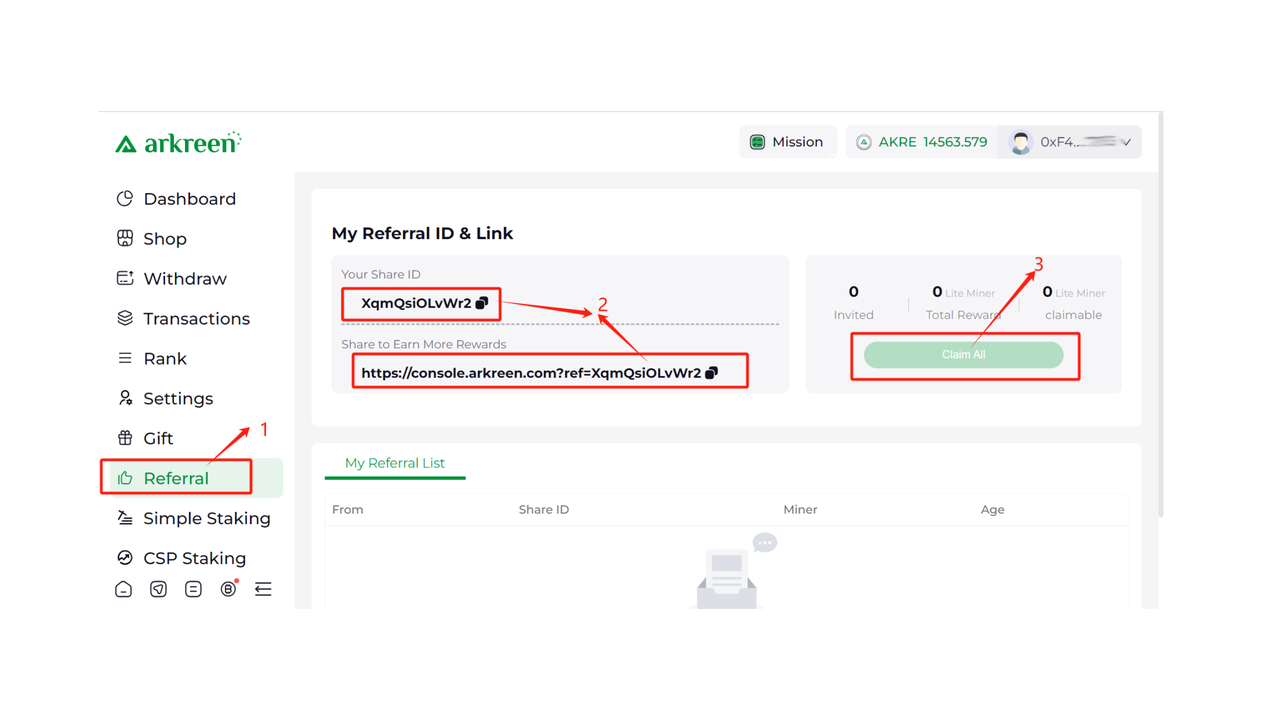
Navigate in the [Console](https://console.arkreen.com/#/referral) menu to the referral section or use the direct link:
You can use this personal link to spread the message and get bonuses if people use it and buy products. Promote it on social media, communities and to friends now and build your exclusive Arkreen network!
**Check out the video guide below:**
{% embed url="" %}
**For each remote miner being purchased by your friend through your referral link, you can claim a Lite Remote Miner as a gift.** Once claimed, you can withdraw your Lite Remote Miners gift at . See [Referral Lite Remote Miners Free Gift](https://docs.arkreen.com/quick-start/arkreen-newcomer-guide/claim-referral-gift) for details.
**Check out the video guide below:**
{% embed url="" %}